As most people use computers and mobile devices to store data, but due to malware attacks, device failure, accidental wrong operation, device theft, etc., each of us has heard or experienced tragic data loss, so we are also gradually realized the importance of data backup. In this blog, you will know about how to Get Your Data Backed up Online in a Free Cloud Backup Service – cBackupper.
Usually, we will back up our important data to external drives or local networks. Disappointingly, they face the same risks as the devices, and data security threats are always with us. Fortunately, with cloud storage services, we can no longer fear these threats. Backing up all data to cloud drive, we can not only easily access these secure backups from anywhere anytime, and easily restore them with simple operations when we need them.
However, cloud storage space is limited, and the price to be paid for not being limited by storage space becomes very expensive. Don’t worry, cBackupper is an online free cloud backup solution that not only provides you with secure unlimited storage space to back up data, but also offers many other convenient functions.
Features of cBackupper
>> $0 for More Free Cloud Space
cBackupper can organize multiple Dropbox, Google Drive, OneDrive and FTP/SFTP cloud storage accounts at one place, make full use of free unused cloud storage space and combine into unlimited space to save your money and store backup. So don’t worry about cloud storage space being limited, add more cloud drives, and use the free storage space they provide to expand unlimited backup space.
>> Direct Cloud-to-cloud Backup
Users can directly backup one cloud to another cloud without downloading the data of one cloud to the local and then uploading it to another cloud again. cBackupper does not use the computer as a transmission intermediary, so it will not occupy the computer’s memory and network resources. In addition, during the backup process, the backup task will continue to be executed as planned after the web page is closed.
>> Easy PC to Cloud Backup
Back up important files on your computer: documents, photos, videos, music, etc. to the cloud easily. Eliminate the risks of system crashes, disk damage, virus infections, natural disasters, and improper human operations that may cause local data loss. And cBackupper will not limit the backup speed, its backup speed depends only on our network speed.
>> Restore Files as You Like
You can restore data from cloud drive for free with a few simple clicks. Through the historical version, you can simply manage the backup files, or you can select some files to be restored in the version to restore, instead of restoring the entire version, which saves time and space.
>> Flexible Backup Settings
Users do not need to manually back up each time, and do not need to back up each time during working hours. CBackupper provides a flexible automatic backup method, which not only can effectively prevent forgetting to back up important data, but also allows users to save time and energy. You can create a plan according to your needs to run automatic cloud backup every day, week or month, and even have 8 different schedule options. You don’t have to worry about anything, because CBackupper will do all the backup work for you.
How to Backup Files from Cloud to Cloud Directly with CBackupper
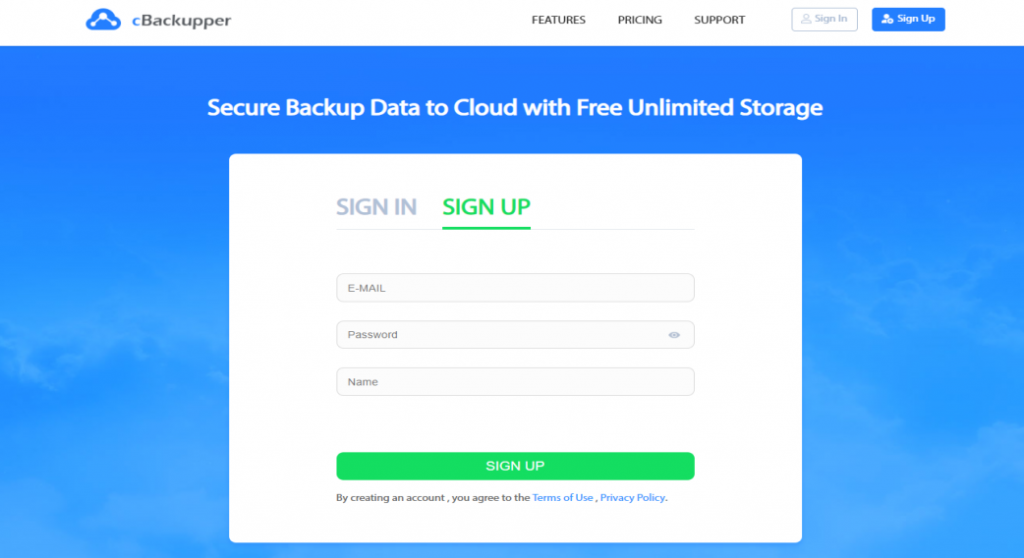
- Create your cBackupper account and then log in;
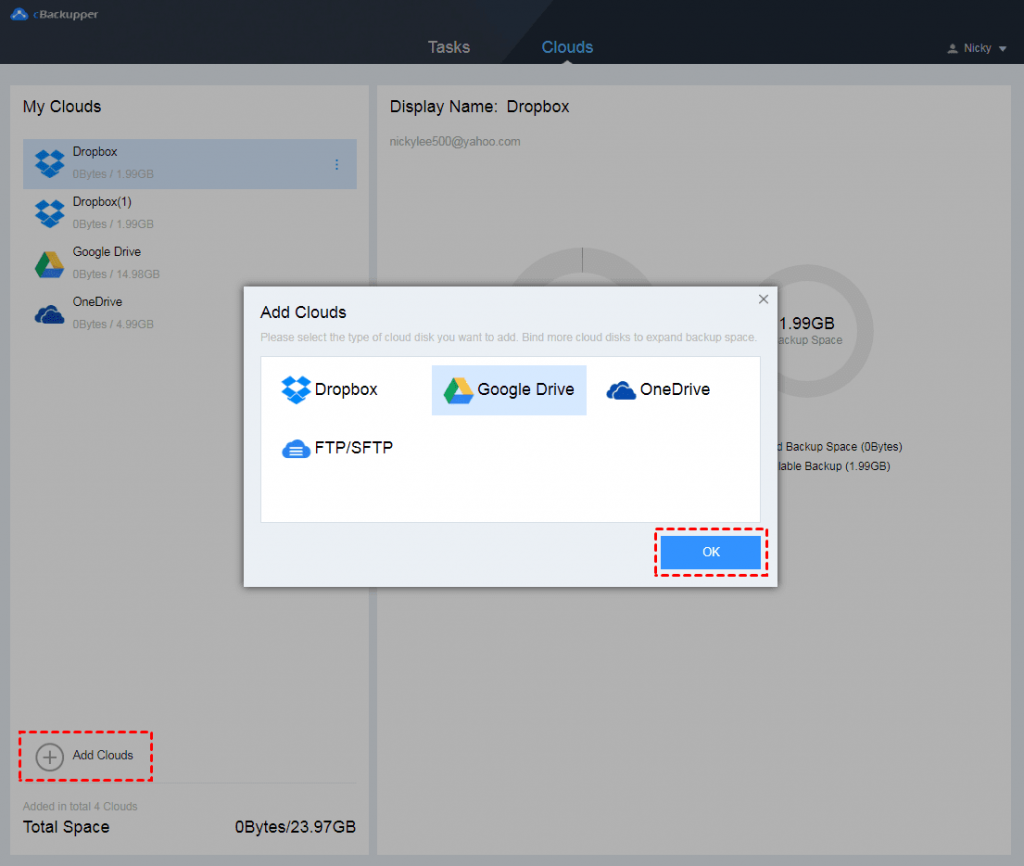
2. Add your cloud drive to cBackupper under the “Clouds” option;
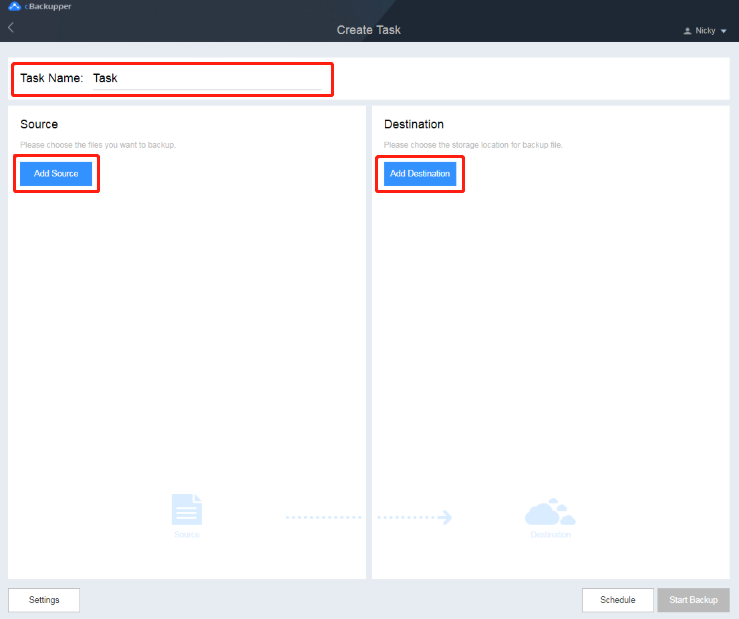
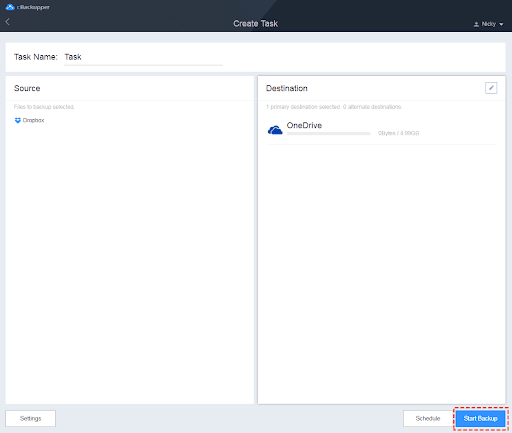
3. Click the “Tasks” tab, and then create a backup task from “Create Task”. Click the “Add Source” button to add a backup cloud drive source, and click the “Add Destination” button to add a backup cloud drive destination .
4. Finally click “Start Backup”.
Conclusion
As an online backup service, cBackupper provides a straightforward and easy-to-use user experience. With the help of it, cloud-to-cloud backup and Pc-to-cloud backup can be easily completed, providing more secure protection for your personal and business data. With just one login, files can be backed up from the cloud or local Pc to the cloud in a flexible manner. The most important thing is that this online cloud backup service is completely free, combining all your cloud space to expand more cloud storage to store backup files.