• Contact
  • Home
  • Terms and Conditions
  • Privacy Policy
  • Free VPN
Easyworknet
No Result
View All Result
  • Login
  • Contact
  • Home
  • Business
    • Cryptocurrency
    • Home Improvement
    • Finance
    • Insurance
    • Digital Marketing
  • Technology
  • Lifestyle
    • Relationships
    • Food
  • Health
    • Fitness
    • Exercise
    • Skin Care
    • Sleep and Rest
  • Education
  • Travel
  • Fashion
  • Game
  • Law
  • Career
  • Contact
  • Home
  • Business
    • Cryptocurrency
    • Home Improvement
    • Finance
    • Insurance
    • Digital Marketing
  • Technology
  • Lifestyle
    • Relationships
    • Food
  • Health
    • Fitness
    • Exercise
    • Skin Care
    • Sleep and Rest
  • Education
  • Travel
  • Fashion
  • Game
  • Law
  • Career
No Result
View All Result
Morning News
No Result
View All Result

What to Do After Getting a New Laptop

Sambit Barua by Sambit Barua
5 years ago
in Gadgets
Reading Time: 2 mins read
0
new laptop

After buying laptops online, many people turn them on regardless. The start playing. However, you might find the laptop is with a problem after acting like this. In this case, you may lose the chance to exchange or return your laptop. So, what should we do first after getting the laptop? For example, after buy HONOR laptops from the official website, we should do this first:

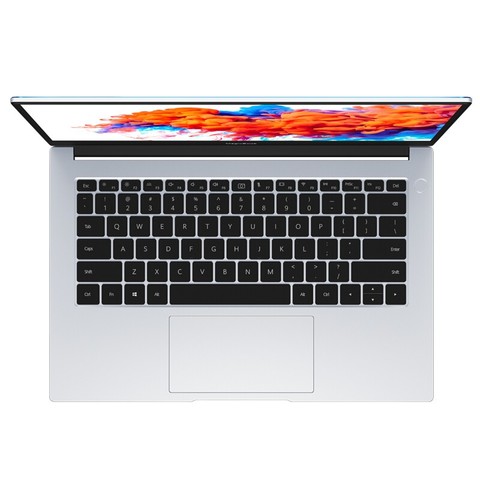
  1. Observe the outlook of the laptop after opening the express. First, check the machine for scratches. What to do when there are obvious outlook problems like scratches and depressions? Contact the seller to return it. There is no one of the above problems? Carry on the next operation step.
https://ss3.bdstatic.com/70cFv8Sh_Q1YnxGkpoWK1HF6hhy/it/u=4171761751,1904885826&fm=26&gp=0.jpg

2. Boot Wizard. For the first opening, there will be a setup guide. Follow the operation guide step by step until you connect to the network. Want to find more about your laptop? Don’t connect the network and click to skip it. Then link to the network after you are satisfied. Because networking will activate the system. You cannot return it with an activated system. Does the laptop have other problems like an automatic restart after activation? In this case, you can return it even if you have activated the system. There is a quality problem after the warranty period? Contact the after-sales service for repair is the only choice. You can find the after-sales for any problem during your us. Pay attention to the after-sales department of the official website. Do not find the customer service department by mistake. The price of the laptop includes the after-sales part. So, don’t waste it.

3. The machine is with no quality problems and is in use for a period of time? Activate the Office! The way to activate Office is to log in to a Microsoft account and bind it. For detailed operations, you can ask customer service.

https://ss0.bdstatic.com/70cFvHSh_Q1YnxGkpoWK1HF6hhy/it/u=1839499683,2935247287&fm=26&gp=0.jpg

In daily use, be careful not to download unknown software. Win10 system has its own security center. It does not need antivirus software. Don’t trust the mainstream antivirus software? Download mainstream antivirus software. You don’t need other housekeeping software at all. Install what you need. During installation, remove the check of some bundled software. Then try not to download and install it into Disk C.

Don’t get too many self-startup software. Open the software you need every time after you startup. Too many self-startup software will slow down the startup. Also, they take up the property of your laptop. Remove the software, materials, games, etc. you will not use in the future. Don’t fill up the hard disk. Still not enough? Go to the after-sales point to install or replace a larger capacity hard disk.

These are the things we should do after receiving a new laptop. I hope this article is helpful for you.

Post Views: 1,762

READ ALSO

What are Steelcase Chairs? Why to use Steelcase chairs?

What are Steelcase Chairs? Why to use Steelcase chairs?

August 15, 2022
Gaming

June 10, 2025
refurbished electronics

A guide to buying the right refurbished electronics

March 4, 2021
oculus quest vs rift

What Is The Difference Between Oculus Quest Vs Rift?

August 5, 2021
Tags: new laptop
Previous Post

How to Know What Type of Grill Is Best for You

Next Post

4 Strategies to Increase Your Business with Search Engine Optimization

Sambit Barua

Sambit Barua

Related Posts

What are Steelcase Chairs? Why to use Steelcase chairs?
Gadgets

What are Steelcase Chairs? Why to use Steelcase chairs?

August 15, 2022
Gaming
Gadgets

June 10, 2025
refurbished electronics
Gadgets

A guide to buying the right refurbished electronics

March 4, 2021
Next Post
Search Engine Optimization

4 Strategies to Increase Your Business with Search Engine Optimization

Ex-Boyfriend Back

Guide to Winning Your Ex-Boyfriend Back

Moderna vaccine safe and effective according to US experts

Moderna Vaccine Safe and Effective According to US Experts

  • Contact
  • Home
  • Terms and Conditions
  • Privacy Policy
  • Free VPN

Easyworknet © Copyright 2026, All Rights Reserved.

No Result
View All Result
  • Contact
  • Home
  • Business
    • Cryptocurrency
    • Home Improvement
    • Finance
    • Insurance
    • Digital Marketing
  • Technology
  • Lifestyle
    • Relationships
    • Food
  • Health
    • Fitness
    • Exercise
    • Skin Care
    • Sleep and Rest
  • Education
  • Travel
  • Fashion
  • Game
  • Law
  • Career

Easyworknet © Copyright 2026, All Rights Reserved.

Welcome Back!

Login to your account below

Forgotten Password?

Retrieve your password

Please enter your username or email address to reset your password.

Log In